Firefox Smart Window Is Turning Your Browser Into AI Workspace
Firefox is taking a different approach to the AI browser race. Instead of turning every part of the browser into an AI feature, Mozilla is building Firefox Smart Window as an optional AI-powered workspace that can help users understand what they are browsing, find information from the live web and reconnect with pages they have already visited.
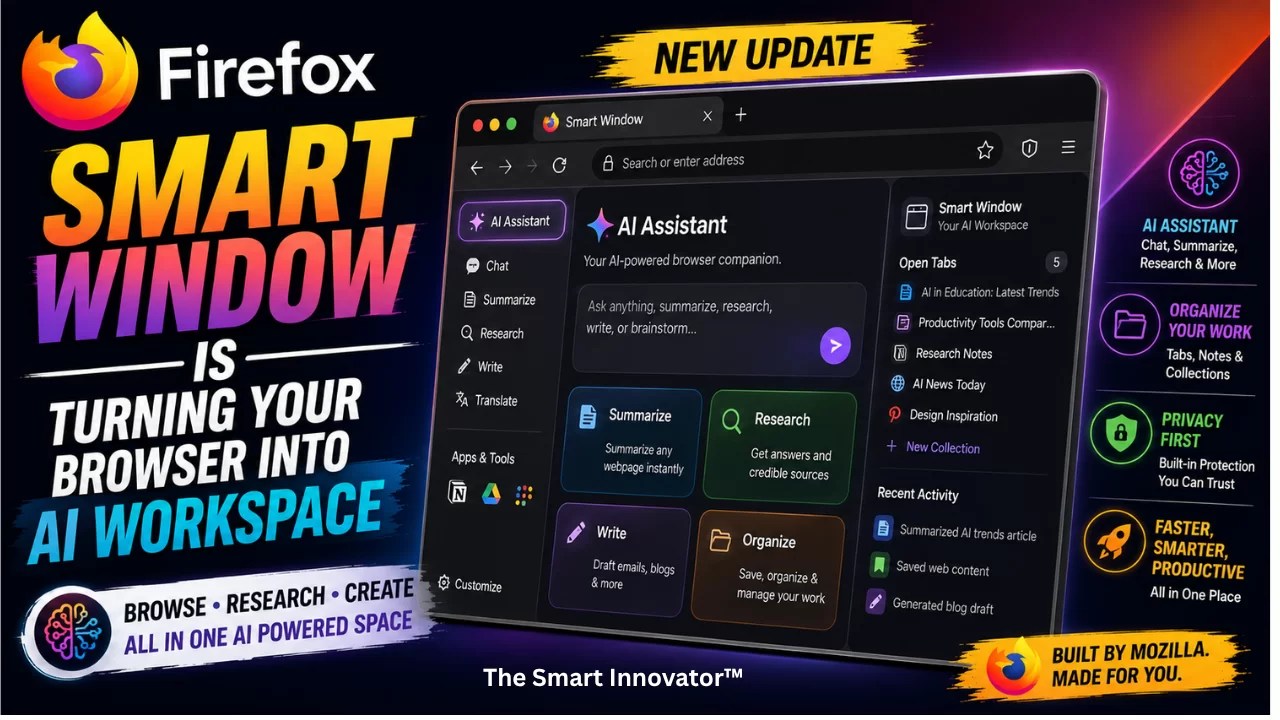
The latest Smart Window update makes the idea considerably more useful. Firefox can now use current web information when answering questions, provide source links for those answers, organize related tabs and even search through browsing history using natural-language requests.
Most importantly, Mozilla is continuing to emphasize user choice. Smart Window is an opt-in experience, while Firefox’s AI Controls let users disable AI features or decide which AI-powered capabilities they want to keep enabled.
What Is Firefox Smart Window?
Smart Window is Mozilla’s optional AI-powered browsing environment inside Firefox. Rather than replacing the traditional browser, it adds an AI assistant that can work with your tabs and browsing activity to help you get things done.
Mozilla originally introduced the concept as an AI Window, with the idea of creating a browser experience where AI could work alongside the web without forcing every Firefox user into an AI-centric workflow.
Today, Smart Window is available as an early beta for supported users, with Mozilla gradually expanding the experience. The current Firefox documentation says Smart Window is available for desktop users in the U.S. and Canada and requires a Mozilla account.
Firefox Smart Window Can Now Search the Live Web
One of the biggest changes is that Smart Window is no longer limited to information already available inside your browser.
Firefox 153 introduced the ability for the Smart Window Assistant to search the web when a question requires timely information. Mozilla uses Exa for this web-search capability, allowing the assistant to retrieve current information rather than relying only on the model’s existing knowledge.
This matters because AI answers can quickly become outdated. A question about today’s news, a current product announcement or a recently changed website can require information from the live web.
The latest Smart Window update also adds source links to AI responses, making it easier to check where the information came from rather than simply accepting an AI-generated answer.
AI That Helps You Find What You Already Saw
Another interesting part of Firefox’s approach is its focus on your existing browsing history.
Imagine you were researching running shoes several days ago but can’t remember which website had the pair you liked. Instead of manually scrolling through your history, you could describe what you remember in natural language.
Smart Window can search through relevant browsing history and help surface previously visited pages. Mozilla is also adding visual previews, making it easier to recognize a page from its appearance rather than relying only on a title or URL.
This is a different use of AI from simply asking a chatbot to generate an answer. Firefox is essentially using AI as a layer over your own browsing activity.
Firefox Can Suggest Groups for Your Open Tabs
Tab overload is another problem Mozilla is trying to solve with AI.
Smart Window can analyze open tabs and suggest groups based on their content. This can make it easier to separate research, shopping, work and other browsing activities without manually organizing every tab.
The latest improvements can also identify duplicate tabs. Instead of having multiple copies of the same webpage open, Firefox can help clean up the tab collection and make it easier to focus on the pages that actually matter.
This Is More Than an AI Chatbot in a Browser
The important distinction is that Mozilla isn’t simply adding another chatbot sidebar to Firefox.
Smart Window is being designed around the browser itself. The assistant can work with open tabs, browsing history and web information, giving it access to context that a standalone chatbot normally wouldn’t have.
That makes Firefox’s approach closer to an AI workspace than a traditional chatbot integration.
Instead of opening a separate AI website and manually copying information from your browser, the assistant can work within the browsing environment.
You Can Choose Which AI Model Firefox Uses
Mozilla is also taking a relatively unusual approach to the AI model powering Smart Window.
Firefox doesn’t lock users into a single AI provider. The current Smart Window model-selection system gives users multiple choices, including models from Google, OpenAI and Alibaba, while advanced users can also connect a custom model.
Firefox’s documentation currently lists Google’s Gemini 2.5 Flash Lite, OpenAI’s gpt-oss-120B and Alibaba’s Qwen3 model among the available choices, although Mozilla notes that the available model list can change over time.
Users can also configure a custom model endpoint. Firefox supports both remote providers and local AI models, including setups using services such as Ollama or Lemonade Server.
That flexibility is important because Mozilla doesn’t want Firefox to become dependent on a single AI ecosystem.
Mozilla Is Making AI Optional
This may be the most important part of Firefox’s AI strategy.
Mozilla knows that not everyone wants AI integrated into their browser. Some users want AI assistants everywhere, while others would rather browse the web without generative AI features.
Firefox therefore introduced an AI Controls section in its desktop settings. Users can turn off generative AI features completely or manage individual capabilities.
The controls cover features such as AI-enhanced tab groups, AI-generated key points in link previews, PDF image alt text and the AI chatbot in the sidebar.
Mozilla’s stated approach is that users should be able to continue using Firefox normally without having AI forced into their browsing experience.
Privacy Is Still a Major Part of the Pitch
Mozilla is also positioning Smart Window around privacy and user control.
The Smart Window privacy notice says the feature is optional and that AI-related processing is governed by specific privacy protections. Mozilla says its third-party AI providers operate under zero-data-retention agreements for Smart Window model usage.
Mozilla also says it does not retain users’ Smart Window chat transcripts without permission for purposes such as model training, and the company says conversations are not used for advertising.
That doesn’t mean Smart Window involves no data processing. Because the feature works with browsing context and AI models, users should still review the relevant privacy settings before enabling it.
The important difference is that Mozilla is explicitly building controls around that choice rather than treating AI as something every Firefox user must accept.
Firefox Is Taking a Different Position in the AI Browser Race
AI browsers are increasingly being designed around the idea that an assistant should become the primary interface for the web.
Mozilla appears to be taking a more neutral approach.
Firefox still wants to use AI to make browsing easier, but the company says the browser should remain useful even for people who don’t want AI. That philosophy explains why Smart Window exists alongside the traditional Firefox experience instead of simply replacing it.
The result is a browser with two different experiences: a conventional Firefox window for users who want the familiar browsing experience, and Smart Window for people who want AI assistance built into their workflow.
What Makes Firefox’s Approach Interesting?
There are three parts of Smart Window that stand out.
- Live information: AI can search current web information instead of relying exclusively on its built-in knowledge.
- Browser context: The assistant can work with open tabs and browsing history rather than operating as an isolated chatbot.
- User choice: Users can choose AI models, configure custom models and control whether Firefox’s AI features are enabled.
Put together, these features make Firefox’s AI strategy less about replacing search and more about making the browser itself easier to operate.
What’s Coming Next?
Mozilla is not stopping with the current Smart Window features.
The company is working toward additional ways of understanding a user’s browsing journey. Future improvements are expected to make it easier to rediscover recent browsing paths and eventually assist with tasks such as filling online forms.
Mozilla’s roadmap also includes other AI-powered browser capabilities, while continuing to expand controls that let users decide which features they want.
When Will Firefox Smart Window Be Available Everywhere?
Smart Window is still a beta experience and isn’t universally available to every Firefox user.
Mozilla’s current support documentation says availability is being gradually expanded, beginning with users in the U.S. and Canada. The experience is currently limited to supported English locales.
That gradual rollout gives Mozilla an opportunity to improve the AI assistant based on real-world feedback before making it a broader part of Firefox.
The Smart Innovator’s Take
Firefox is entering the AI browser race without completely changing what Firefox stands for.
Instead of saying that every browsing task should become an AI interaction, Mozilla is building AI as an optional layer on top of the browser. That’s a meaningful difference at a time when many technology companies are aggressively pushing AI into search, operating systems, browsers and productivity software.
The latest Smart Window features make that strategy more compelling. Real-time web search addresses one of the biggest weaknesses of traditional AI assistants, while source links make answers easier to verify. AI-powered tab organization and natural-language history search could also solve everyday browser problems that have nothing to do with generating text.
But the most interesting part may ultimately be the choice of AI models. Giving users the ability to choose between major providers—or connect a local model—could make Firefox one of the more flexible AI browsers for people who care about digital sovereignty and control.
Firefox isn’t saying that everyone needs AI.
It’s essentially saying: if you want AI, Firefox can work with you—and if you don’t, you can keep using the browser without it.
Frequently Asked Questions (People Also Ask)
Firefox Smart Window is an optional AI-powered browsing environment that can work with open tabs, browsing history and web information to help users research, organize and navigate the web.
Yes. Starting with Firefox 153, the Smart Window Assistant can search the web for questions that require timely information. The latest update also adds source links to AI responses.
Firefox currently offers model choices from providers including Google, OpenAI and Alibaba. Advanced users can also configure their own compatible AI endpoint, including local AI models.
Yes. Firefox has an AI Controls section that allows users to disable generative AI features completely or manage individual AI capabilities.
Mozilla’s current Smart Window documentation says the feature is limited to supported English locales in the U.S. and Canada during its gradual rollout. Therefore, availability should not currently be assumed for Indian Firefox users.
No. Smart Window is an optional experience, and Firefox continues to provide a traditional browsing experience. Mozilla also provides AI Controls for managing or disabling supported AI features.
Follow The Smart Innovator™ for more such cover stories. Subscribe to our Newsletters for tech world updates. Interested in Hindi Technical contents? Follow दी स्मार्ट इनोवेटर


0 Comments